How to Add Music to a Photo with AI | AIMakeSong
AI Make Song
7/30/2026
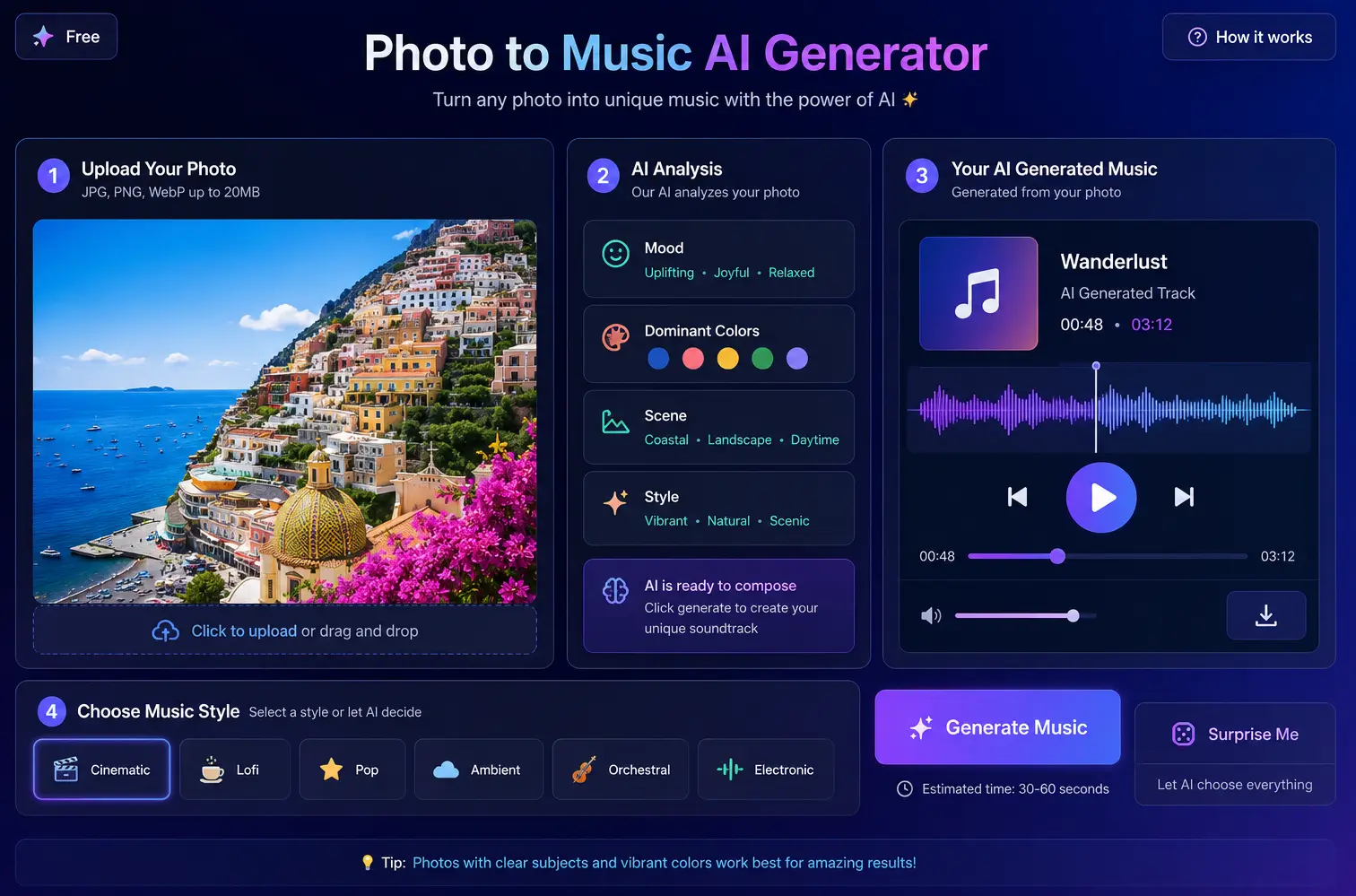
A photo can show a place, product, memory, or mood. With AI, that same photo can also become the starting point for music.
Instead of searching through stock music libraries, you can upload a picture, describe the sound you want, and generate music that matches the image's colors, scene, and emotion.
This guide explains how to add music to a photo with AI, how image-to-music tools work, which photos produce better results, and what prompts you can use to create better tracks.
Quick note: This guide is about using AI to generate new music from a photo. If you only want to add an existing song to a photo slideshow, a video editor such as CapCut, iMovie, or Canva may be enough.
What Does It Mean to Add Music to a Photo with AI?
Adding music to a photo with AI means using software to analyze an image and create audio based on the image's mood, colors, scene, and style.
This process is often called:
- Image to music
- Photo to music AI
- Image to audio
- Picture to audio
- Photo to sound
- Photo to song
For example, a sunset beach photo may become warm lofi music. A dark city street may become cinematic electronic music. A wedding photo may become soft piano music. A fantasy game scene may become orchestral background music.
The image gives the AI a visual direction. Your prompt gives it a musical direction. Together, they help the AI create a track that feels connected to the photo.
How Does AI Turn a Photo into Music?
An AI image to music converter usually combines computer vision and music generation. The system reads visual details from the image, then uses those signals to guide the generated audio.
The AI may look at:
| Visual Element | How It May Affect the Music |
|---|---|
| Color | Bright colors may suggest lighter or happier music |
| Lighting | Dark lighting may suggest slower or more dramatic music |
| Scene | Nature, city, product, portrait, or abstract art can guide the style |
| Mood | Calm, energetic, romantic, mysterious, playful, or cinematic |
| Composition | Simple images may create cleaner tracks; busy images may create richer sound |
| Prompt | Your text direction can guide genre, tempo, instruments, and use case |
For example, if you upload a quiet forest image and ask for "cinematic ambient music," the AI may create a slow and spacious track. If you use the same image and ask for "upbeat pop," the result may feel brighter and more energetic.
That is why the best photo to music AI results usually come from a clear image plus a clear prompt.
How to Add Music to a Photo with AI Step by Step
The simplest way to add music to a photo with AI is to upload the image, choose a music direction, generate a track, preview the result, and download the audio.
Basic workflow:
- Choose a clear photo.
- Upload it to an AI music tool.
- Add a short prompt.
- Generate the music.
- Preview and adjust.
- Download or use the track.
Now let's go through each step.
Step 1: Choose a Photo with a Clear Mood
Start with a photo that already communicates a feeling.
Good image types include:
- Travel photos
- Product photos
- Wedding or family pictures
- Pet photos
- Game concept art
- AI-generated artwork
- Album cover drafts
- Posters or campaign visuals
- Social media images
The stronger the visual mood, the easier it is for an image to sound converter to create a useful result.
For example, a golden beach image gives the AI more emotional direction than a blurry screenshot. A clean product shot works better if you also describe the brand feeling you want, such as "premium," "fresh," or "playful."
Step 2: Upload the Photo to an AI Music Tool
Next, upload your image to a tool that supports image to music or picture to audio generation.
The image becomes the creative input. The music becomes the output.
Some tools create short background music. Others can create longer tracks, loops, or song-like results. The exact output depends on the platform, settings, and available credits.
At this stage, you usually do not need music theory or audio production skills. The key is choosing the right image and giving the AI a clear direction.
Step 3: Add a Short Music Prompt
Although some tools can generate music from an image alone, adding a short prompt usually improves the result.
Your prompt can include:
- Genre
- Mood
- Tempo
- Use case
- Instruments
- Video or content type
A good prompt does not need to be long. One clear sentence is enough.
Weak prompt:
Make music for this photo.
Better prompt:
Create warm lofi background music for a sunset beach travel video.
Best prompt:
Create relaxed lofi pop music for this sunset beach photo, with warm chords, soft drums, and a peaceful travel vlog feeling.
The better prompt gives the AI context, style, and purpose.
Step 4: Generate the Music
After uploading the photo and adding your prompt, generate the track.
This is the main convert image to audio step. The AI uses your image and prompt to create a playable music result.
Depending on the tool, the output may be:
- A short music sample
- A background loop
- A full instrumental track
- A song-like track
- A draft for further editing
AI-generated music from photos works best as a creative starting point. Most creators generate two or three versions and refine the prompt before finding the right match.
Step 5: Preview and Adjust the Result
Listen to the generated track and compare it with the image.
Ask yourself:
- Does the music match the photo's mood?
- Is the tempo too fast or too slow?
- Does the genre fit the use case?
- Is the track too dramatic, too soft, or too busy?
- Would it work for a video, slideshow, ad, game scene, or social post?
If the result is close but not perfect, change one part of your prompt.
Original prompt:
Create music for this travel photo.
Improved prompt:
Create warm acoustic lofi music for a peaceful sunset travel video.
Small changes in mood, genre, or use case can make the output much more useful.
Step 6: Download or Use the Track
Once you like the result, download the audio if your plan allows it.
You can use AI-generated photo music for:
- Short videos
- YouTube intros
- Instagram Reels
- TikTok videos
- Product ads
- Slideshows
- Game prototypes
- Art portfolios
- Personal memory videos
- AI creative experiments
Before publishing, always check the tool's usage rights, commercial license, and download rules.
Best Prompts for Adding Music to Photos
Here are prompt examples you can copy and adjust.
Travel Photo to Music Prompt
Prompt:
Create relaxed lofi pop music for this sunny beach photo, with warm chords, soft drums, and a travel vlog feeling.
Best for:
- Travel videos
- Lifestyle clips
- Vacation slideshows
- Social media posts
Related use case: image to audio
Product Photo to Music Prompt
Prompt:
Create clean upbeat electronic music for this product photo, suitable for a modern online ad.
Best for:
- Product launch videos
- Brand campaigns
- E-commerce ads
- Social media ads
Related use case: image to sound conversion
Wedding Photo to Music Prompt
Prompt:
Create romantic piano and soft strings for this wedding photo, with a warm and emotional mood.
Best for:
- Wedding slideshows
- Memory videos
- Anniversary clips
- Family videos
Related use case: picture to audio
Pet Photo to Music Prompt
Prompt:
Create cute playful pop music for this pet photo, with a happy and light social media style.
Best for:
- Pet videos
- Memes
- Reels
- TikTok clips
Related use case: convert picture to sound
Game Scene to Music Prompt
Prompt:
Create mysterious ambient orchestral music for this fantasy forest game scene, with a calm adventure feeling.
Best for:
- Game prototypes
- Concept art
- RPG scenes
- Indie game sound tests
Related use case: photo to sound
AI Artwork to Music Prompt
Prompt:
Create dreamy electronic ambient music for this surreal AI artwork, with soft synths and a cinematic mood.
Best for:
- AI art posts
- Visual portfolios
- Experimental videos
- Album cover concepts
Related use case: AI music image generator
What Photos Work Best for AI Music Generation?
Some photos give AI a stronger creative signal than others.
| Photo Type | Works Well? | Why |
|---|---|---|
| Sunset landscape | Yes | Strong color, mood, and atmosphere |
| Product photo | Yes | Clear subject and commercial use case |
| Wedding photo | Yes | Emotional tone is easy to guide |
| Pet photo | Yes | Clear playful or warm mood |
| Game concept art | Yes | Strong scene and genre direction |
| Abstract AI artwork | Usually | Works best with a clear prompt |
| Blurry screenshot | Not ideal | Weak visual mood |
| Plain white image | Not ideal | Needs a detailed prompt |
| Busy collage | Depends | May confuse the mood unless guided |
If your photo is simple or unclear, describe the intended feeling in your prompt.
Example:
Create elegant minimal piano music for this clean white product image, suitable for a luxury skincare ad.
Image to Music vs Adding Music Manually
There are two common ways to add music to a photo project.
You can manually choose an existing track, or you can generate new music from the photo with AI.
| Method | How It Works | Best For | Limitation |
|---|---|---|---|
| Manual music selection | Search a music library and choose a track | Users who already know the exact style they want | Can take time to find a track that fits the image |
| AI image to music | Upload a photo and generate matching music | Users who want fast mood-based audio ideas | May need several versions to get the right match |
Manual selection gives you more control when you already know what track you want. AI image to music is useful when the visual idea comes first and you want the music to follow the photo's mood.
Image to Music vs Photo to Song
The difference between image to music and photo to song is scope.
Image to music is a broad term. It can include background music, mood audio, loops, sound design, or instrumental tracks created from an image.
Photo to song is more specific. It usually means generating a more complete song-like track from a photo, often with structure, melody, lyrics, or vocals.
For example:
- A travel photo can become background music for a vlog.
- A wedding photo can become a soft instrumental track.
- An album cover can inspire a full song idea.
- A memory photo can become a photo to song concept with lyrics.
If you want a full song, include more detail in your prompt.
Example:
Turn this photo into a dreamy pop song about summer memories, with soft vocals, warm guitar, and a nostalgic chorus.
If you only need background music, keep the prompt simpler.
Example:
Create soft nostalgic background music for this summer memory photo.
Common Mistakes When Adding Music to Photos with AI
Mistake 1: Using a Vague Prompt
A vague prompt gives the AI too little direction.
Weak prompt:
Make music.
Better prompt:
Create calm piano background music for a family photo slideshow.
Mistake 2: Choosing a Photo with No Clear Mood
A random image may not tell the AI what kind of music to create.
If the image is visually simple, use your prompt to explain the mood.
Example:
Create premium, clean, modern music for this minimal product image.
Mistake 3: Ignoring the Final Use Case
Music for a product ad is different from music for a wedding slideshow.
Before generating, decide where the audio will be used:
- Ad
- Reel
- Slideshow
- Game scene
- Art project
- YouTube video
- Personal post
Then include that use case in the prompt.
Mistake 4: Accepting the First Result Too Quickly
AI music generation is creative. The first result may not always be the best.
Try changing:
- Mood
- Genre
- Tempo
- Instruments
- Use case
If "cinematic" sounds too dramatic, try "soft ambient," "warm acoustic," or "minimal piano."
A Simple Beginner Workflow
If you are new to photo to music AI, start with this workflow:
- Pick one photo with a clear mood.
- Upload it to a Photo to Music AI Generator.
- Add one short prompt.
- Generate two or three versions.
- Choose the best match.
- Download the track.
- Add it to your video, slideshow, or post.
Example beginner prompt:
Create warm cinematic background music for this photo, suitable for a short social media video.
If you want to test this workflow, you can try AIMakeSong's Photo to Music AI Generator online after login and use daily free credits to create your first image-based music track.
FAQ: How to Add Music to a Photo with AI
How do I add music to a photo with AI?
Upload your photo to an AI music tool, choose a style or mood, add a short prompt, generate the track, preview the result, and download the audio if your plan allows it.
Can I turn an image into music online?
Yes. You can use an online image to music converter to upload a picture and generate matching audio from the image's mood, scene, and style.
What is image to audio?
Image to audio means using an image as the input and generating audio as the output. The audio can be background music, a loop, a sound idea, or a song draft.
Is picture to audio the same as photo to music?
They are similar. Picture to audio is a broader term for turning any image into sound, while photo to music usually refers to creating music from a photo.
Can I add music to an AI-generated image?
Yes. You can upload an AI-generated image and use an AI music image generator workflow to create matching audio based on its mood, colors, and visual style.
Can AI create a full song from a photo?
Yes, depending on the tool. Some AI tools can create song-like results from a photo, especially if you add a detailed prompt with genre, mood, theme, lyrics, or vocals.
Do I need music skills to use image to music AI?
No. You do not need music theory or DAW software. You only need a photo and a short description of the music style or mood you want.
Can I use AI-generated photo music commercially?
It depends on the platform, license, and account plan. Always check commercial usage rights before using AI-generated music in ads, client projects, or monetized videos.
Conclusion
Adding music to a photo with AI is a simple way to turn a visual idea into sound.
Instead of manually searching for background music, you can upload a photo, describe a mood, and generate a track that matches the image. This works for travel videos, product ads, slideshows, game scenes, pet posts, AI artwork, and personal memories.
The best results usually come from a strong image plus a clear prompt. Start with one photo, generate a few versions, and adjust your prompt until the music fits the visual.
Try AIMakeSong's Photo to Music AI Generator online and hear what your photo becomes.