How to Make a Song Instrumental with AI | AIMakeSong
AI Make Song
7/29/2026
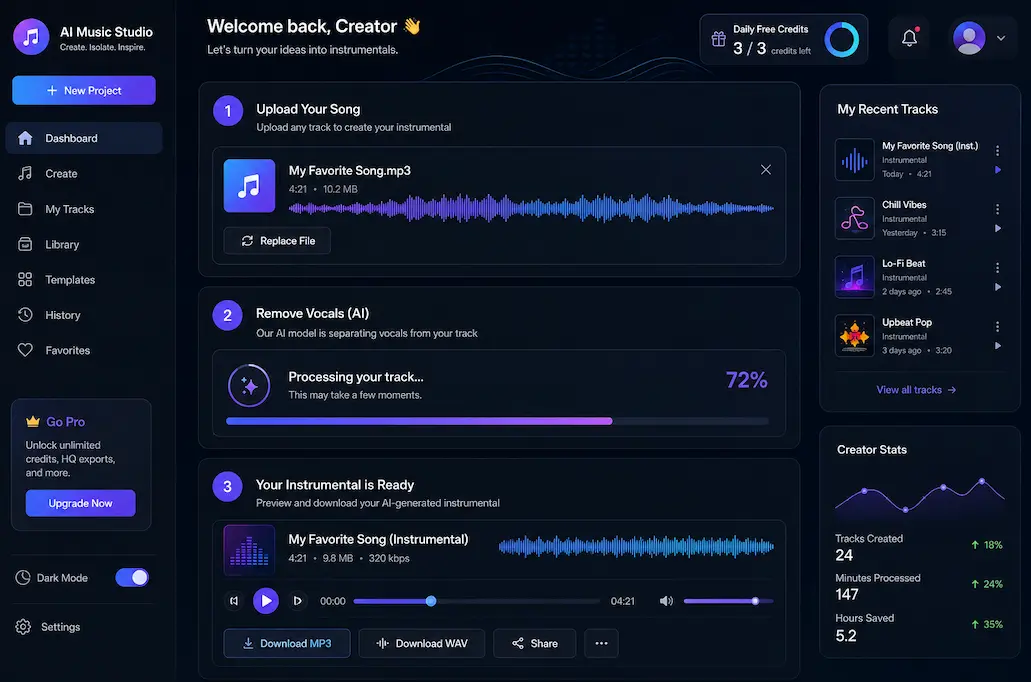
If you want to remove vocals from a song and keep the background music, the fastest option is usually an AI instrumental maker. Instead of editing stems manually, you can upload a track, let AI reduce the vocal layer, and download an instrumental version for singing, karaoke, video editing, music practice, or remix ideas.
This guide explains how to make a song instrumental with AI, what kind of songs work best, what results to expect, and how to avoid common mistakes.
If you want to try the workflow directly, you can use AIMakeSong's instrumental maker to create instrumental tracks online in your browser.
What Does It Mean to Make a Song Instrumental?
To make a song instrumental means to create a version of a track where the lead vocal is removed or reduced while the background music remains.
A regular song may include:
- Lead vocals
- Backing vocals
- Drums
- Bass
- Guitar
- Piano
- Synths
- Effects
- Room ambience
An instrumental version is also often called a:
- Backing track
- Karaoke track
- Vocal removed version
- Minus-one track
- Instrumental track
The goal is not always to create a perfect studio stem. For many users, the goal is to get a usable backing track for practice, learning, editing, or creative work.
How to Make a Song Instrumental with AI
The easiest way to make a song instrumental online is to use an AI vocal remover or instrumental maker. Here is the basic process.
Step 1: Choose the Right AI Instrumental Maker
A good AI instrumental maker should do more than simply remove vocals. Before choosing a tool, check whether it supports the workflow you need.
Look for:
- Browser-based processing: No software installation required.
- Audio preview: You should be able to listen before downloading.
- Common file support: MP3 and WAV support are useful for most users.
- Clear output options: The tool should make it easy to identify and download the instrumental version.
- Simple credit or pricing system: Free trials or daily credits help you test quality first.
- Fast workflow: Upload, process, preview, and download should be easy to complete.
AIMakeSong is designed for users who want to create instrumental from song online without installing audio software. You can upload a track, process it with AI, preview the result, and download the instrumental version.
Step 2: Upload a Clean Audio File
The source file has a major impact on the final result. AI vocal removal works better when the original audio is clean and balanced.
For better results, use:
- A high-quality MP3 or WAV file
- A studio version instead of a live recording
- Clear vocals and instruments
- Balanced volume
- Less background noise
- Less distortion
Avoid files with:
- Crowd noise
- Strong room echo
- Screen recording compression
- Very low bitrate audio
- Vocals buried inside loud guitars or synths
- Heavy reverb on the vocal
If you want to get the instrumental of a song with fewer artifacts, start with the best source audio you can access.
Step 3: Remove Vocals with AI
After uploading the file, choose the instrumental or vocal removal option. The AI analyzes the song and tries to separate vocal elements from the rest of the music.
In simple terms, AI vocal removal looks for patterns that sound like human voice and separates them from the instrumental background. This process is sometimes called source separation. The model does not have access to the original studio stems, so it estimates which parts are vocal and which parts are instrumental.
The output usually keeps:
- Drums
- Bass
- Rhythm instruments
- Melodic instruments
- Background music
And reduces:
- Lead vocals
- Some backing vocals
- Vocal effects
- Vocal-heavy reverb
This is why AI instrumental results can be very useful, but not always perfect.
Step 4: Preview the Instrumental Track
Before downloading, listen carefully to the instrumental result.
Check for:
- Remaining vocal traces
- Muffled instruments
- Missing high frequencies
- Strange echo
- Watery or robotic artifacts
- Volume changes
- Backing vocals that still remain
A clean studio pop track with centered vocals may produce a better result than a live recording with crowd noise and heavy reverb. If the output is not clean enough, try another version of the same song or use a higher-quality file.
Step 5: Download and Use the Instrumental Version
Once the preview sounds good enough, download the instrumental track and use it in your project.
Common uses include:
- Karaoke practice
- Singing lessons
- Cover song rehearsal
- School performances
- Video background music
- Remix drafts
- DJ edits
- Arrangement study
- Content creation
Important note: removing vocals does not make a copyrighted song royalty-free. If you plan to publish, monetize, or use the track commercially, make sure you have the proper rights or licenses.
Ways to Get the Instrumental of a Song
If you are wondering how to get the instrumental of a song, there are three common methods.
Find the Official Instrumental Version
Some artists, labels, or producers release official instrumental versions. This is usually the cleanest option because it comes from the original project files.
Best for: professional covers, commercial use, official performances.
Limitation: many songs do not have an official instrumental available.
Use an AI Instrumental Maker
If the official version is not available, an AI tool is often the fastest option. You upload the full song, remove vocals, preview the result, and download the backing track.
Best for: practice, karaoke, video drafts, remix planning, music learning.
Limitation: quality depends on the original mix and AI separation result.
Recreate the Instrumental Manually
You can rebuild the backing track in a DAW using virtual instruments, MIDI, samples, and mixing tools.
Best for: producers, custom covers, high-control projects.
Limitation: takes more time and requires music production skills.
AI Instrumental Maker vs Traditional Audio Editing
Before AI vocal removal became common, people often tried to make instrumentals using EQ, phase cancellation, or center-channel removal. These methods can still help in some cases, but they are limited.
| Method | Best For | Main Limitation |
|---|---|---|
| AI instrumental maker | Fast online instrumental creation | May leave artifacts depending on the mix |
| Center-channel removal | Stereo tracks with centered vocals | Can remove important instruments too |
| EQ editing | Small vocal reduction adjustments | Cannot fully isolate vocals |
| Manual recreation | Custom backing tracks | Requires time and production skills |
| Official instrumental | Best possible quality | Not available for every song |
For most users who want to turn music into instrumental quickly, AI is the easiest starting point.
How to Compare AI Instrumental Tools
Different AI instrumental tools may produce different results on the same song. Before choosing one, compare them based on practical workflow factors.
Useful comparison points include:
- Output quality: Are vocals reduced cleanly?
- Remaining artifacts: Does the track sound natural after processing?
- Processing speed: How long does the tool take?
- Preview support: Can you listen before downloading?
- Supported formats: Does it support common formats like MP3 and WAV?
- Ease of use: Is the workflow clear for beginners?
- Online access: Does it work in the browser, or does it require installation?
- Free trial or credits: Can you test before paying?
If your goal is quick practice or content drafting, choose a simple online tool. If your goal is professional production, you may need additional editing after generating the instrumental.
What Songs Work Best for AI Vocal Removal?
AI vocal removal works better on some tracks than others.
Easier Songs to Process
You may get better results with songs that have:
- Clear lead vocals
- Stable background music
- Studio-quality mixing
- Limited reverb
- Fewer overlapping vocal layers
- Less crowd noise
Harder Songs to Process
The result may be less clean if the song has:
- Heavy vocal reverb
- Layered backing vocals
- Live audience noise
- Distorted vocals
- Vocals mixed closely with guitars or synths
- Low-quality audio
- Complex stereo effects
No AI tool can honestly promise perfect instrumental output for every song. The better the source audio, the better the result usually is.
Can You Make Any Song Instrumental?
You can try to make any song instrumental, but the output quality will vary.
AI vocal removal is not the same as having the original studio stems. It works by estimating and separating audio layers from a finished mix. If vocals overlap heavily with instruments, some vocal traces may remain, or some instruments may sound slightly changed.
For casual use, practice, karaoke, and video drafts, AI-generated instrumental tracks are often good enough. For commercial release or professional production, you may need official stems, licensed instrumentals, or additional audio cleanup.
Tips to Create a Cleaner Instrumental from Song
If you want to create instrumental from song with better results, use these tips.
Use the Highest Quality Audio File Available
A clean MP3 or WAV file usually works better than a compressed screen recording.
Choose the Studio Version When Possible
Live recordings often include crowd noise, room echo, and microphone bleed, which make vocal separation harder.
Preview Before Downloading
Always listen to the output before using it in a project. Check whether vocal traces or audio artifacts are acceptable for your use case.
Try a Different Version of the Song
A radio edit, remastered version, or cleaner upload may produce a better instrumental than a low-quality file.
Use the Result as a Starting Point
For remixing or production, treat the AI instrumental as a draft. You can continue editing, EQ, mixing, or layering sounds in your DAW.
Common Workflows for Instrumental Tracks
Instead of thinking only about removing vocals, it helps to think about the full workflow.
For Karaoke Practice
Choose a song, create the instrumental version, preview whether the melody is clear enough, then practice singing over the backing track.
For Cover Songs
Generate the instrumental, adjust the key or tempo if needed in your editing software, record your vocal, and mix it with the backing track.
For Video Editing
Create an instrumental version when the original vocal competes with narration, dialogue, or voiceover. Then place the backing track under the spoken audio in your video timeline.
For Remix Ideas
Use the instrumental to study the arrangement, drums, bass, and chord progression. Then use it as a draft reference inside your DAW.
How to Make a Song Instrumental Online with AIMakeSong
If you want a simple browser-based workflow, AIMakeSong can help you convert song into instrumental online.
Basic steps:
- Sign in to AIMakeSong.
- Claim daily free credits.
- Upload your song.
- Choose the instrumental option.
- Let AI reduce the vocals.
- Preview the result.
- Download the instrumental track.
This is useful when you want to remove vocals and create instrumental tracks online without installing audio software.
FAQ
How do I make a song instrumental?
You can make a song instrumental by using an AI instrumental maker. Upload the song, choose vocal removal or instrumental mode, preview the result, and download the instrumental version.
How can I get the instrumental of a song?
You can look for the official instrumental version, use an AI instrumental maker, or recreate the backing track manually in music production software.
Can I make a song instrumental online?
Yes. Online AI tools let you upload a song, remove or reduce vocals, preview the result, and download an instrumental track directly in your browser.
Can I make any song instrumental?
You can try, but the result depends on the original mix. Songs with heavy reverb, layered vocals, live noise, or low-quality audio may be harder to separate cleanly.
Is an AI instrumental the same as an official instrumental?
No. An official instrumental usually comes from the original project files. An AI instrumental is generated from a finished mixed song, so it may contain artifacts or remaining vocal traces.
Does removing vocals make a song royalty-free?
No. Removing vocals does not change the copyright status of the original song. If you want to publish, monetize, or use the track commercially, make sure you have the proper rights or licenses.
What is the best way to remove vocals from a song?
For most users, AI vocal removal is the easiest method because it works online and does not require professional production software.
Final Thoughts
Learning how to make a song instrumental with AI is useful if you need a quick backing track for singing, karaoke, video editing, remix planning, or music practice.
The best approach is simple: start with a clean audio file, use an AI instrumental maker, preview the result, and download the version that works for your project.
If you want to try it online, AIMakeSong's instrumental maker lets you remove vocals and create instrumental tracks directly in your browser with daily free credits after login.
Ready to Start Creating?
▶ Make Song Instrumental - Remove vocals and create clean backing tracks online
🎵 Use Vocal Remover Tool - Separate vocals from any song with AI
🎛️ Try Stem Splitter - Split songs into vocals, drums, bass, and more
🎼 Try AI Song Generator Now - Transform your ideas into complete songs instantly
Explore More AIMakeSong Tools
Music Tools
- AI Song Maker: Generate Unique Music Free
- AI Music Generator: Create Songs with AI
- Text to Song Generator: Create Music From Words
- AI Lyrics to Song: Turn Lyrics Into Complete Music
- The Ultimate AI Lyrics Generator for Effortless Song Writing
- AI Song Name Generator: Create Catchy Song Titles
- Sample a Song: Generate Similar Music from a Reference Track
- Hum to Song: Turn Humming Into a Complete Song
- Happy Birthday Song Generator: Create Personalized Gift Music
- Cheer Music Maker: Create Energetic Cheer Songs
- Diss Track Generator: Create AI Diss Tracks
- AI Rap Generator: Create Rap Songs with AI
- FNF Song Maker: Create Friday Night Funkin Style Music
- Song to Instrumental Converter: Remove Vocals and Create Backing Tracks
- AI Vocal Remover: Separate Vocals and Instrumentals
- Stem Splitter: Split Songs Into Multi-Track Stems
- Online Audio Cutter: Trim and Cut Audio Online
- AI Music Editor: Edit and Refine AI Music
- Singing Voice: Create AI Singing Voices
- AI Song Cover: Create AI Covers with Different Voices
- AI Audio to MIDI: Convert Audio Into Editable MIDI
- AI Music Analyzer: Analyze Tempo, Key, and Structure
- AI Sound Effects Generator: Create Custom Sound Effects
- Sound Effects Library: Browse Ready-to-Use AI Sound Effects
- Photo to Music AI Generator: Turn Photos Into Music
Image Tools
Video Tools
- AI Music Video Generator: Create Music Videos with AI
- Photo Video Maker: Create Videos from Photos and Music
- AI Lyric Video Maker: Create Lyric Videos with AI
- AI Singing Photo Generator: Make Photos Sing with AI
- AI Text to Video: Generate Videos from Prompts
- Reference to Video: Create Videos from Image, Video, and Audio References