How to Extend a Song With AI in 2026
AIMakeSong
8/19/2026
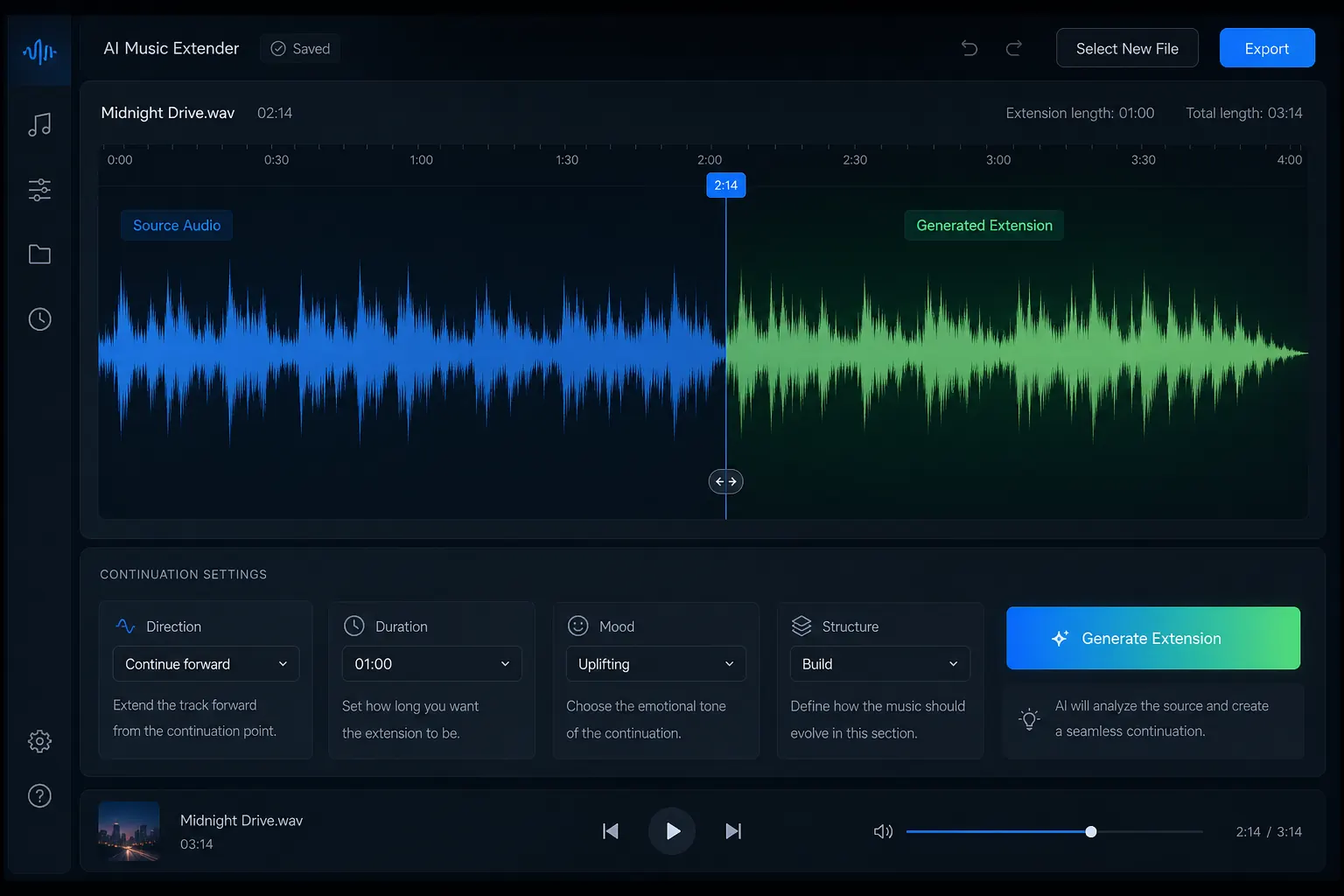
A short song can have a great idea but still end too soon. Maybe a beat loop needs more structure, a demo needs a chorus, or your video runs longer than the music.
An AI music extender can help turn existing audio into a longer track. Instead of starting from a blank prompt, it uses your song, demo, or loop as the starting point and generates a new section that follows the original musical direction.
This guide explains how to extend a song with AI, when to use AI extension instead of looping, what to look for in an AI music extender, and how to extend MP3 or unfinished music.
What Is an AI Music Extender?
An AI music extender is a tool that continues an existing piece of music with AI.
You upload a song clip, MP3, WAV, demo, beat loop, or instrumental. The tool then generates new audio designed to continue the source track.
Unlike a typical AI music generator, which may create a song from a text prompt, an AI music extender starts with audio you already have.
The goal is simple:
Keep the original idea and create more music around it.
Depending on the tool, the extension may follow parts of the source such as:
- Rhythm and tempo
- Key and chord movement
- Melody and hooks
- Instrumentation
- Genre and mood
- Energy and arrangement
- Overall song structure
The result should not simply make the file longer. It should create a continuation that feels related to the original.
When Should You Use an AI Song Extender?
An AI song extender is useful when your music has a strong idea but needs more length or structure.
Common situations include:
- A beat loop sounds good but repeats too much
- A demo has a verse but no chorus
- A short track does not fit the full video
- A song ends too suddenly
- A melody needs an intro, bridge, or outro
- You want several possible continuation ideas
- You want to test new arrangements before editing manually
In these cases, a song extender AI workflow can help you explore new sections without rebuilding the whole track from scratch.
How AI Music Extension Works
Most AI music extension tools follow a similar workflow.
Upload Your Music Clip
Start with the audio you want to extend.
This can be:
- An MP3
- A WAV file
- A beat loop
- A demo
- An instrumental
- A short song idea
If you are looking for an AI music extender MP3 workflow, check the tool's supported formats and file limits before uploading.
A clean source file can make review easier. A clear rhythm, stable musical idea, and useful section ending can also help you judge the generated continuation.
Let AI Read the Source Track
The AI music extender uses the existing audio as context for the new section.
Depending on the product, the system may evaluate musical features such as timing, melody, harmony, arrangement, mood, and sound character.
This is what separates an AI extension workflow from a basic loop.
A loop repeats existing audio.
An AI extension generates new material based on the source.
Choose the Extension Direction
Do not only ask:
“Make this song longer.”
Think about what should happen next.
You may want to:
- Continue the current section
- Add a chorus
- Build an intro
- Create an outro
- Add an instrumental break
- Extend background music
- Increase or reduce energy
- Explore a new transition
Whether you want to build up to an energetic drop, soften the instrumentation for a bridge, or transition smoothly into a fade-out, setting a clear musical intention ensures the generated continuation feels intentional rather than random.
A clearer creative direction also makes it easier to evaluate whether a result fits your arrangement.
Generate, Preview, and Export
The tool creates one or more possible continuations.
Listen to the result together with the original track.
Check:
- Does the transition feel smooth?
- Does the rhythm still fit?
- Does the mood make sense?
- Does the new section move the song forward?
- Does the ending work for your project?
You may want to regenerate the section or change the direction before exporting the final version.
How to Make an AI Song Extension Sound Natural
Creating extra audio is only part of the job. The new section also needs to feel like part of the song.
Keep the Musical Direction Consistent
A soft acoustic track usually needs a continuation that respects its existing mood unless you want a clear change.
Think about:
- Genre
- Energy
- Tempo
- Instrumentation
- Mood
- Song structure
A short instruction such as “build into a warmer final chorus” can be more useful than asking for more music with no direction.
Choose a Strong Extension Point
The best place to continue is not always the final second of the file. In music production, cutting audio at an arbitrary timestamp often causes rhythmic hiccups or abrupt harmonic shifts.
A useful starting point may be:
- After a 4-bar or 8-bar musical phrase
- At the end of a completed verse or chorus
- At the end of a stable instrumental groove
- Before an existing outro
- At a natural transition or cymbal crash
Producer Tip: Make sure your cut point aligns with the musical grid (downbeat). If your audio ends with a natural reverb tail or cymbal decay, include it so the AI can analyze the acoustic environment and match the room ambiance seamlessly.
Give the New Section a Purpose
More seconds do not always mean a better track.
Decide what the new section needs to do:
- Build tension before a chorus
- Introduce a contrasting bridge
- Create an instrumental solo or break
- Extend background music for visual pacing
- Turn a 4-bar loop into a full 32-bar arrangement
- Build a smooth, professional outro
A clear purpose makes it easier to judge whether the generated segment enhances the song structure.
Review the Transition
The connection between the original and new section is where most continuation errors happen.
Listen critically for:
- Rhythm & Downbeat Alignment: Does the beat stay in tempo without skipping a 16th note?
- Harmonic Flow: Does the chord transition make musical sense in the original key?
- Dynamic Level: Are the drums or vocals noticeably louder or quieter in the new section?
- Timbre & Tone: Do the guitars, synths, or vocals retain the same mixing color?
- Decay & Overlap: If needed, a subtle 10–30ms crossfade in your editor can polish any tiny seam.
An AI-generated section provides the musical ideas, while simple listening and light editing deliver a release-ready track.
AI Music Extender vs AI Music Generator
An AI music extender and an AI music generator solve different problems.
| Feature | AI Music Extender | AI Music Generator |
|---|---|---|
| Starting point | Existing audio | Prompt or settings |
| Main goal | Continue or complete music | Create a new track |
| Typical input | MP3, WAV, demo, loop | Prompt, genre, mood, lyrics |
| Best for | Existing ideas | New ideas |
| Main challenge | Keep continuity | Build a strong song |
If you already have music you like, an AI song extender is usually the better fit.
If you have no source track, a music generator may be more useful.
AI Music Extender vs Looping
Why not just loop the original song?
Because the two methods create different results.
Looping is useful when repetition is fine.
An AI music extender is more useful when you want new material instead of the same bars again.
How to Extend an MP3 With AI
If your song is already saved as an MP3, the process is usually simple.
Step 1: Prepare Your MP3
Make sure the file is clean and that you have the right to use it.
Step 2: Upload the Audio
Choose an AI music extender that supports your file format.
Step 3: Choose the Extension Point
Select the end of the track or another useful musical point, depending on the tool.
Step 4: Describe the Direction
For example:
Continue the current indie pop style and build into a soft outro.
Or:
Keep the same groove and create a short instrumental section before the final chorus.
Step 5: Generate and Compare
Listen to the full track, not just the new section.
Step 6: Export the Best Version
Choose the version that fits your project and review the final file before publishing.
How to Extend Background Music for Video
One of the most common reasons to extend music is simple:
The video is longer than the soundtrack.
For example:
- Video: 2 minutes
- Music: 1 minute 20 seconds
- You need another 40 seconds.
Instead of repeating the same section, you can use an AI music extender to create additional music that follows the original direction.
This can be useful for:
- YouTube videos
- Short films
- Product videos
- Social content
- Podcasts
- Tutorials
- Ads
- Event videos
The best result is not just a longer track. It is a track whose new section fits what happens in the video.
How to Extend an Unfinished Song With AI
AI song extension can also help during the writing process.
Imagine you already have:
- A verse
- A melody
- A hook
- A chorus
But you do not know what should come next.
An AI tool can give you several directions to explore.
Add a Bridge
Useful when the song needs contrast before the final chorus.
Add Another Chorus
Useful for a more familiar song structure.
Create an Instrumental Break
Useful when you want more space between vocal sections.
Build an Outro
Useful when the song feels complete but needs a stronger ending.
The goal is not to let AI make every creative choice. It can help you explore ideas faster.
What Makes a Good AI Music Extender?
Not every extension tool works in the same way. When comparing options, look at the actual workflow.
Style Consistency
The generated section should fit the source track's genre, mood, instruments, and overall direction.
Rhythm and Musical Continuity
The tool should be able to work from the existing musical context instead of simply repeating the input.
Creative Control
Prompts, style controls, mood settings, lyrics, or section direction can help you guide what happens next.
Audio Format Support
If you need an AI music extender MP3, check supported formats before choosing a tool.
Free Testing
An AI music extender free option or new-user free credits can be useful when you want to compare several results before paying.
How AIMakeSong Helps Extend Music With AI
AIMakeSong is built for creators who already have music material and want to develop it further with AI.
You can use it to:
- Extend short music clips
- Continue beat loops
- Develop unfinished demos
- Make background music longer
- Explore new song sections
- Guide the continuation with creative direction
- Create longer versions of existing music
AIMakeSong requires registration and login. Logged-in users can receive new-user free credits, making it possible to test the workflow before using a larger amount of credits.
AIMakeSong is positioned as an affordable option after the new-user trial. Extra generations use credits.
Try AIMakeSong AI Music Extender
Best Use Cases for AI Music Extension
Extend a Short Beat Loop
Beat loops can sound great but become repetitive over time. An AI music extender can help develop the groove into a longer arrangement.
Finish an Unfinished Demo
A songwriter may have a verse or hook but not know what should come next. A song extender AI workflow can provide possible next sections to edit and refine.
Make Video Background Music Longer
When a soundtrack does not cover the full edit, you can extend music with AI instead of repeating the same short section.
Create an Outro or Transition
A track may need a longer ending, a softer transition, or more space before the final section. AI extension can help explore those options.
Test Alternate Song Directions
You can also use AI extension as a creative tool. Generate several possible next sections and compare different ways the same song could develop.
Common Mistakes When Using an AI Music Extender
Uploading Poor Source Audio
Noisy or unclear audio can make it harder to review a continuation. Use the cleanest source available.
Giving No Creative Direction
When prompts or controls are available, use them. A simple instruction can help narrow the result.
Expecting One Generation to Be Perfect
A good first result is possible, but regeneration and editing are still part of the process.
Judging Only the New Section
A continuation can sound good alone but still feel wrong when added to the full song. Always listen from the start.
Ignoring Usage Rights
Only upload music you own or have permission to use. An AI tool does not give you rights to someone else's copyrighted recording.
FAQ
What does an AI music extender do?
An AI music extender takes existing audio and creates a new section that continues it. The goal is to make the track longer while keeping the new section connected to the original.
Can I use AI to extend a song?
Yes. You can use an AI song extender to generate new verses, choruses, bridges, or outro sections directly from your original audio file without re-recording or starting from scratch.
Can I use AI to extend music?
Yes. Whether it's an instrumental loop, a video background track, or a complete demo, AI music extension analyzes the tempo, key, and instrumentation to compose natural musical continuations.
Is there an AI music extender free option?
AIMakeSong requires login, and logged-in users can receive new-user free credits. This gives creators a way to test an AI music extender free workflow before choosing a paid plan.
Can I extend MP3 audio with AI?
Yes, when the tool supports MP3 uploads. AIMakeSong is designed around audio-based music workflows, supporting common audio formats so you can upload your existing tracks directly.
Is an AI song extender the same as looping audio?
No. Looping repeats the exact same bars over and over. An AI song extender composes new variations, chord progressions, and arrangements that naturally build upon the source track.
Can I extend music online without installing software?
Yes. Modern AI music tools run completely in the browser. You can upload your audio directly online, test extensions with new-user credits, and export high-quality audio files without installing complex DAW software or heavy plugins.
Do I need music production experience?
No advanced production experience is required to start. Basic listening and editing skills can still help when choosing between generated versions and reviewing the final track.
Final Takeaway
Learning how to extend a song with AI is not simply about adding more seconds.
Start with a strong source track. Choose a useful continuation point. Give the AI a clear direction. Then listen to the full song and decide whether the new section actually improves it.
Use looping when repetition is enough. Use manual editing when you need exact control. Use an AI music extender when you want to explore new musical material from an existing track.
AIMakeSong provides a way to try this workflow with new-user free credits after login, while also offering broader AI music tools for creators who want to keep developing the same project.