How to Make a YouTube Short in 2026 (Step-by-Step)
AIMakeSong
8/25/2026
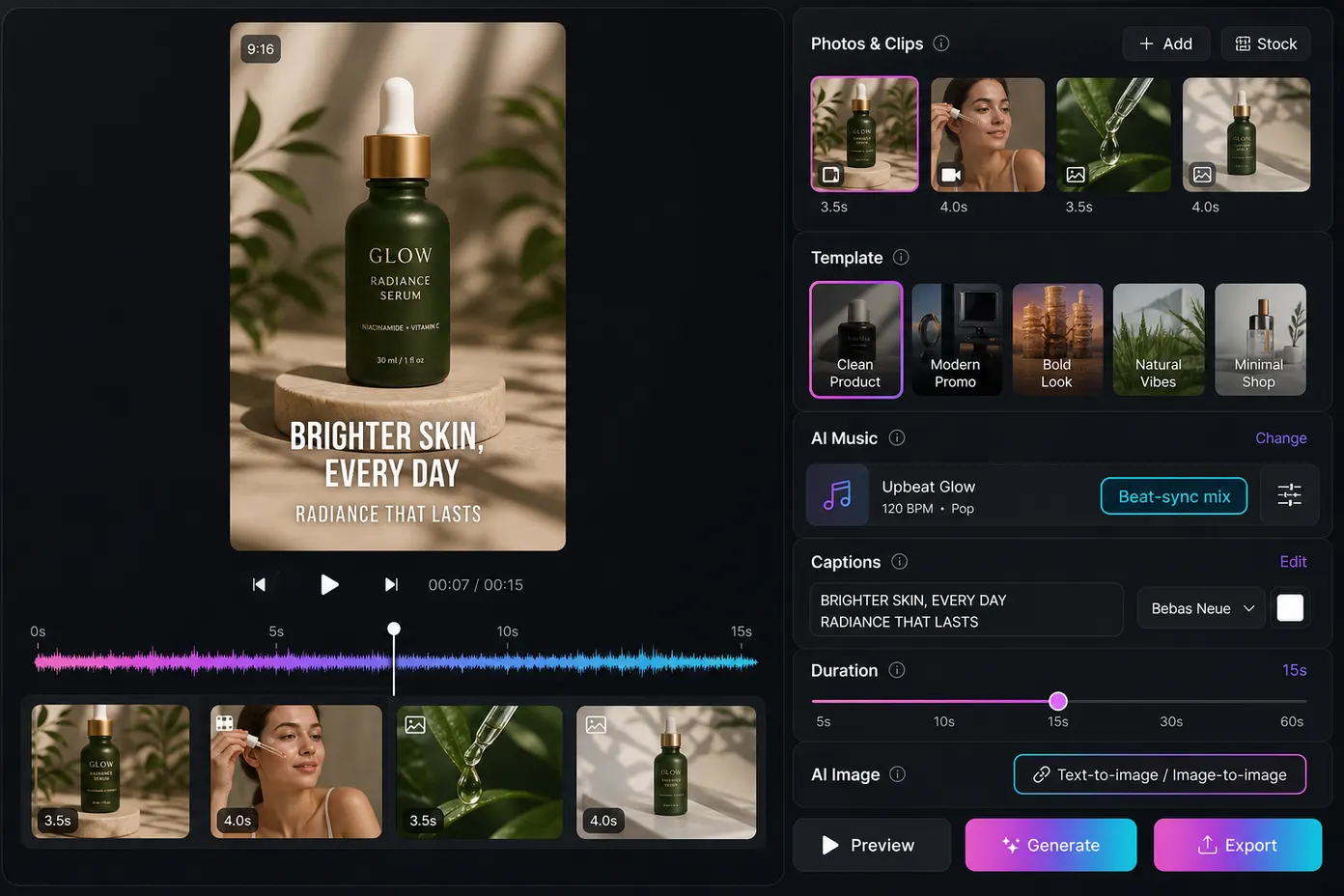
To make a YouTube Short, create a square or vertical video that is up to 3 minutes long, then record it in the YouTube app or upload it through YouTube Studio. A 9:16 vertical video is the most common choice for full-screen phone viewing. You can also create a short video from photos and clips before uploading it.
YouTube classifies eligible square or vertical videos up to 3 minutes as Shorts. For standard channels, this rule applies to videos uploaded on or after October 15, 2024.
If you want to post the same video on TikTok or Instagram Reels, keeping a vertical format makes reuse easier. Always check each platform's current limits before you export.
What Is a YouTube Short?
A YouTube Short is YouTube's short-form video format. For standard channels, a video can be treated as a Short when it is square or vertical and up to 3 minutes long. Videos uploaded on or after October 15, 2024, follow this rule.
Viewers can find Shorts in the Shorts feed, search, the homepage, and on a channel. You do not need a camera setup or desktop editor. A phone is enough to record your first one.
In everyday language, a shorts video usually means any short-form vertical clip. A YouTube Short is the version published on YouTube.
Three Ways to Make a YouTube Short
Choose the method that fits what you already have.
- Record in the YouTube app. This is the fastest option when you want to speak to camera or capture something happening now.
- Upload from a computer. This works well when you already have an edited vertical file.
- Build the video from photos and clips first. This is useful for product shots, travel photos, event footage, or other assets you already have.
All three methods still need to follow YouTube's current Shorts format rules.
How to Make a YouTube Short in the YouTube App
This is the basic in-app process described by YouTube Help.
- Sign in to the YouTube app.
- Tap Create and select Short.
- Tap or hold Capture to record your video.
- If needed, change the duration using the option in the upper-right corner.
- Add music, filters, text, or other effects.
- Tap Done, preview the video, then tap Next.
- Add a title, choose the audience setting, and set your privacy options.
- Tap Upload Short or save your work as a draft.
YouTube also sets default privacy differently by age: creators aged 13–17 default to private, while creators aged 18 or older default to public. You can change the setting before publishing.
How to Upload a YouTube Short From a Computer
You can make a YouTube Short on desktop without recording inside the mobile app. The desktop steps below follow YouTube Help.
- Sign in to YouTube Studio.
- Click Create and choose Upload videos.
- Select a square or vertical video that is up to 3 minutes long.
- Add the title, description, and audience information.
- Publish, schedule, or save the video as a draft.
YouTube currently allows up to 15 short videos to be selected at once during desktop upload. Each video still needs its own details before publishing.
A wide 16:9 file is not the right format when your goal is a YouTube Short. Use a square or vertical file instead.
How to Make a Short Video From Photos or Clips
This is often the easiest path for shops, creators, travel recaps, and anyone who already has media.
What You Need
- Photos, short video clips, or both
- One clear idea
- A vertical frame
- Captions that are easy to read
- Music you are allowed to use
A Simple Cut
- Choose 4–8 photos or short clips.
- Put the strongest visual in the first 1–3 seconds.
- Arrange the rest in a simple order, such as problem → product or place → detail → result.
- Add short captions and keep important text away from the bottom edge.
- Add music that you can legally use.
- Export in a vertical format, then upload through YouTube Studio or the YouTube app.
If you are missing a visual, you can create one with a text-to-image tool or refine an existing image with image-to-image generation. Then add the result to your short video. This is optional; real photos and clips work just as well.
AIMakeSong's short video maker can help with this workflow. You can create or refine visuals, combine photos and clips, and prepare a vertical video with features such as AI music and captions before uploading the final file to YouTube.
How to Create YouTube Shorts People Actually Finish
The format gets your video into the right content type. Good structure helps people stay.
Start with a clear hook. Show the result, product, question, or main visual in the first few seconds. Avoid a long introduction.
Keep one main idea per Short. One tip, one product, one story, or one moment is easier to follow than several unrelated ideas.
Use captions when they help. Many viewers watch short-form video without sound. Captions can make the main point easier to follow.
Keep important content away from the bottom. YouTube interface elements can cover text or other key details near the bottom of the screen.
Match the music to your video length. YouTube says most songs in the Shorts Audio Library can be used for up to 90 seconds in a 3-minute Short, although some tracks have shorter limits. You can also use royalty-free music from the YouTube Audio Library.
For Shorts longer than one minute, an active copyright claim can cause the video to be blocked globally until the claim is resolved. See YouTube Help on three-minute Shorts.
These are practical tips, not guarantees of views.
Common Mistakes When You Make a YouTube Short
- Uploading a landscape 16:9 video when your goal is a Short
- Using music you do not have permission to use
- Placing important text too close to the bottom
- Trying to cover several unrelated topics in one short video
- Skipping the audience setting before publishing
- Making every Short as long as possible just because 3 minutes is allowed
A shorter video can be better when the idea is simple. Length should support the story, not fill time.
When a Short Video Maker Helps — and When It Does Not
A dedicated short video maker can be useful when:
- You already have photos or short clips
- You want captions and music without a complex timeline
- You need one vertical file for YouTube Shorts, Reels, or TikTok
- You want to create several short videos from existing assets
- You want to add AI-generated or AI-edited visuals before the final cut
Stay in the YouTube app when:
- You are recording a talking-head video right now
- You only need YouTube's built-in sounds and effects
- You want the fastest path from recording to publishing
AIMakeSong is not a replacement for YouTube's camera. It is a YouTube Shorts maker option for assembling the video before you upload it, especially when your source material includes photos, clips, or AI-generated visuals.
Quick Checklist Before You Tap Upload
- File is square or vertical
- Length is 3 minutes or less
- The opening is clear within the first few seconds
- Captions are readable on a phone
- Music is allowed for your use
- Title is within YouTube's current limit
- Audience setting is complete
- If you do not want a Short, use a wider format such as 16:9 instead
FAQ
How Do I Make a YouTube Short if I Have Never Edited Video?
The easiest option is to record in the YouTube app and publish it as a Short. You can also upload a square or vertical video from YouTube Studio. If you already have photos or clips, you can create a short video from those assets first. You do not need advanced editing skills.
How Long Can a YouTube Short Be?
A YouTube Short can be up to 3 minutes long when it uses a square or vertical format and meets YouTube's current Shorts rules. For standard channels, the three-minute rule applies to videos uploaded on or after October 15, 2024.
What Size Should I Export for a YouTube Short?
A square or vertical file can qualify as a Short. For mobile viewing, 9:16 vertical is the common choice because it fills the phone screen. YouTube supports Shorts uploads up to 1080p.
Can I Make a YouTube Short on a Computer?
Yes. Sign in to YouTube Studio, click Create, choose Upload videos, and select a square or vertical file that is up to 3 minutes long. You can also upload several Shorts at once.
How Do I Create YouTube Shorts From Photos?
Choose a small set of photos, put the strongest one first, add motion or simple cuts, then add captions and music. Export the result vertically and upload it to YouTube. If you need another visual, an image-to-image tool can help create a new version from an existing photo.
Can I Create a Short Video With AI?
Yes. You can start with your own photos and clips, or create new visuals with AI. A text-to-image or image-to-image workflow can help when you need a missing scene before you create a short video for YouTube Shorts.
Can I Use the Same Short Video on TikTok and Instagram Reels?
Often yes, when the video is already vertical and fits the other platform's current limits. However, TikTok and Instagram can have different duration, music, and content rules, so check each platform before publishing.
Can I Use Music in a Three-Minute YouTube Short?
Yes, but music limits depend on the track and the way you add it. YouTube says most songs in the Shorts Audio Library can cover up to 90 seconds in a 3-minute Short, while some songs may be limited to 60 or 30 seconds. Royalty-free music from the YouTube Audio Library can also be used.
For Shorts longer than one minute, an active copyright claim can block the video globally.
Can I Earn Money From YouTube Shorts?
Yes, through the YouTube Partner Program, if the channel meets current rules. YouTube Help currently lists full ad and Premium eligibility as 1,000 subscribers plus either 4,000 qualified watch hours in the last 12 months, or 10 million qualified Shorts views in the last 90 days. Shorts Feed watch hours do not count toward the 4,000-hour path.
YouTube has announced higher new-applicant thresholds starting February 1, 2027: 1,000 subscribers plus either 8,000 qualified watch hours in the last 365 days, or 20 million qualified Shorts views in the last 90 days. Existing YPP members are not affected by that entry change. Check YouTube's current YPP pages before you apply, because these numbers can change.
Will Adding #Shorts Make My Video a Short?
No. A hashtag does not replace the format rules. YouTube currently uses factors such as length and aspect ratio to classify eligible videos as Shorts.
Make a Short From Photos or Clips
Already have photos or clips? Use AIMakeSong's short video maker to prepare a vertical draft with captions, music, and your existing visual assets before you upload it to YouTube.
Log in for a free starter credit allowance and try the workflow first.