AI Music Editor: Change Lyrics & Song Style | AIMakeSong
AI Make Song
7/11/2026
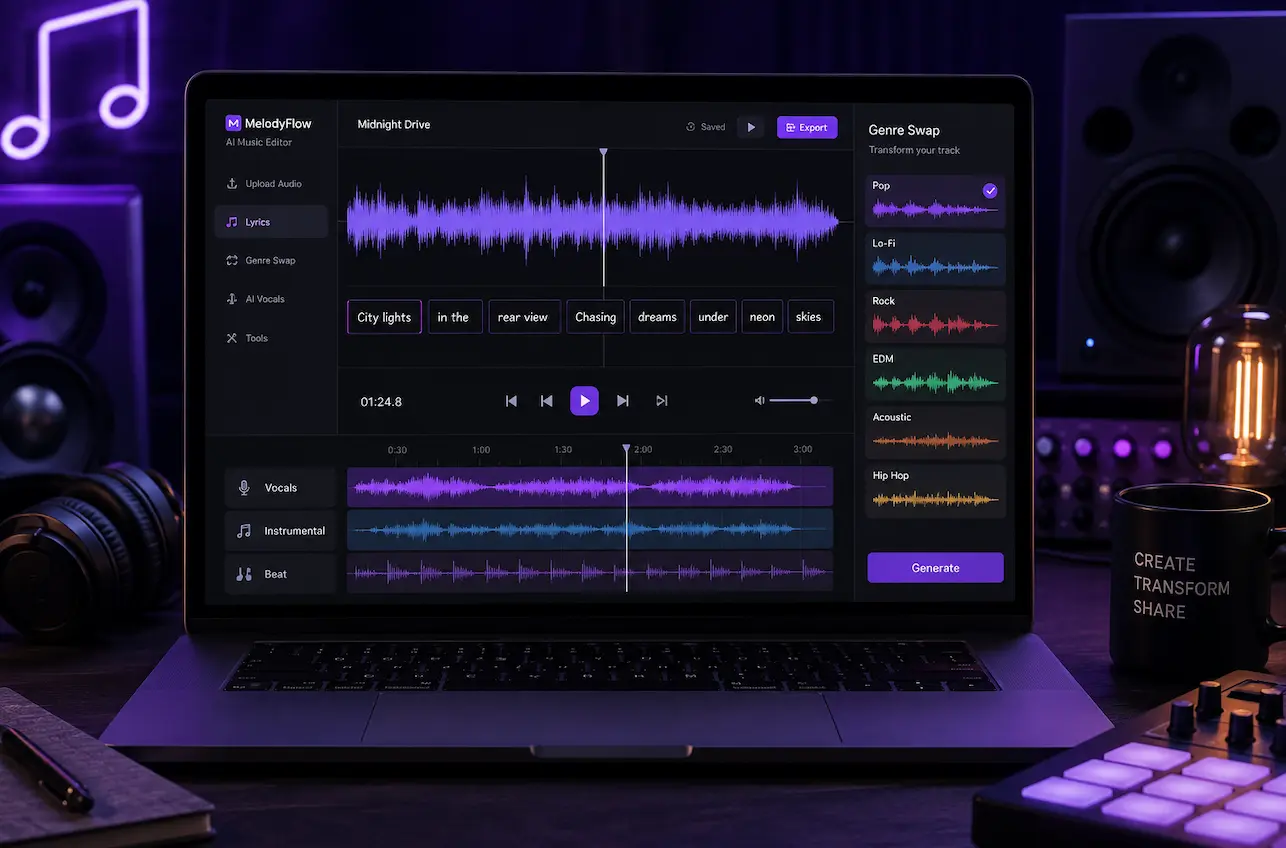
Music editing used to mean expensive software, years of training, and hours of trial and error. Not anymore. Today, an AI music editor can rewrite lyrics, switch genres, and rebuild vocals from a simple text prompt, all in your browser.
Whether you are a content creator who needs clean tracks for brand deals, a teacher adapting songs for students, or a DJ prepping remixes for a gig, AI has collapsed the gap between idea and finished track. In this guide, we will walk through what AI music editing can do, how it works, and how you can try it for free.
What Is an AI Music Editor?
An AI music editor is a tool that uses neural networks to analyze and modify existing songs. Think of it as a smart assistant that can take any track apart, change specific parts, and put it back together without noticeable quality loss.
Here is what happens under the hood. The AI splits a song into layers: vocals, drums, bass, and melody. This process, called stem separation, was one of the first major breakthroughs in AI audio editing. But modern models go much further. They can rewrite words while matching the original singer's tone and rhythm. They can shift a pop ballad into a lo-fi groove. They can even swap explicit lines for clean alternatives while keeping the beat intact.
The result is simple: you can modify the lyrics in a song using AI in about the time it takes to brew a cup of coffee. No studio. No plugins. No learning curve.
What Can You Actually Do with It?
Let us get specific. Here are the core editing tasks an AI music editor handles today.
Rewrite Song Lyrics
Want to turn a love song into a birthday tribute? Or adapt a hit for a different audience? You can change song lyrics with AI by typing new words and letting the tool match them to the original melody. The AI preserves the vocal tone, timing, and emotional feel, so the new lyrics sound like they belonged there all along.
One cover artist used this approach to rewrite verses for 12 tracks in a single weekend. That is a process that used to take three full days in a studio. Now it costs nothing to try with free daily credits.
Switch Genres and Styles
Ever wondered what your favorite ballad would sound like as an EDM track? With AI change style of song technology, you can find out in seconds. Upload the track, pick a new genre, and the AI rebuilds the instrumentation, tempo, and mood while keeping the vocals in sync.
A DJ tested this for a wedding gig, converting five slow ballads into dance remixes. Each remix took under ten minutes. No DAW, no manual tempo mapping, and no audio engineering background required. When you use change genre of song AI tools, the system handles the hard parts automatically. This example is based on a DJ's reported event preparation workflow.
Create Clean Versions for Content
Social media platforms have strict rules about explicit content. If you are a TikTok creator or YouTube publisher, you need radio-safe tracks. An AI lyric changer lets you swap specific words or lines while keeping everything else untouched.
One creator used this method to build three brand-safe videos that each hit over 2 million views, based on self-reported analytics. She learned how to use change the lyrics of a song AI tools and stopped depending on pre-cleaned versions or generic royalty-free music.
Localize Songs for New Audiences
Music teachers and marketers use AI editing to adapt songs across languages. You can change lyrics of a song online free to create Spanish, French, or German versions of English tracks. One language teacher reported that students who learned with AI-adapted songs showed noticeably better vocabulary retention than students using standard audio lessons. That observation came from one semester of classroom use.
How to Edit a Song with AI: Step by Step
Ready to try it yourself? Here is the typical workflow using AIMakeSong's AI music editor.
Step 1: Upload Your Track
Drag and drop your song into the editor. The tool accepts MP3, WAV, FLAC, and AAC files. Once uploaded, the AI scans the track and identifies its structure, including verses, chorus, bridge, and instrumental sections.
Step 2: Choose Your Edit
Pick what you want to change. You can:
- Rewrite lyrics by typing new words and letting the AI match them to the melody
- Swap genre by selecting from pop, rock, EDM, lo-fi, jazz, and more
- Adjust vocals by fine-tuning the tone or replacing specific phrases
- Remove or replace sections by editing one part without touching the rest
The editor shows a preview before applying any changes, so you always know what you are getting.
Step 3: Generate and Download
Hit the generate button. Most edits finish in seconds to a few minutes, depending on track length and complexity. Once the AI finishes rebuilding your track, download it in high quality with no watermarks on your exports and no noticeable quality loss.
Log in to claim free daily credits and try changing lyrics of a song online free right now. No payment is required to start.
Why AI Music Editing Beats Traditional Methods
If you have ever tried editing audio in a traditional DAW like Ableton or Logic Pro, you know the pain. It takes months to learn the software, hundreds of dollars in plugins, and hours of manual work for a single edit.
AI editing changes the math completely.
| Factor | Traditional Editing | AI Music Editor |
|---|---|---|
| Learning curve | Months to years | Minutes |
| Cost | $1,000+ for software and plugins | Free daily credits, with paid plans 30 to 70 percent cheaper |
| Time per edit | 2 to 8 hours | Seconds to a few minutes |
| Lyric changes | Manual vocal re-recording | Type new words, AI handles the rest |
| Genre swaps | Full remix from scratch | One-click style transfer |
Pricing comparison is based on publicly available information as of July 2024. Actual costs may vary.
The price difference is worth highlighting. Mainstream AI music platforms often charge $20 to $50 per month for similar features. AIMakeSong runs 30 to 70 percent cheaper and gives you free credits as soon as you sign in.
Real Use Cases: Who Is Using AI Music Editing Right Now?
Content Creators
A YouTube creator needed clean versions of 20 songs for a brand partnership. Using the AI music editor, she swapped explicit lines across all tracks in one afternoon. Total cost: zero, thanks to free daily credits. The brand approved every track on the first review.
DJs and Remix Producers
A wedding DJ was asked to play upbeat versions of the couple's favorite ballads. Instead of buying pre-made remixes, he uploaded the originals and used AI change style of song to convert them into dance tracks. Five remixes, done in under an hour. This example is based on a DJ's reported event preparation workflow.
Music Teachers
A high school music teacher adapts popular songs for class performances. She rewrites lyrics to fit school-appropriate themes and translates them for ESL students. By learning how to AI change lyrics of song workflows, she creates custom lesson materials every week, something that would have been impractical with traditional tools.
Podcasters and Streamers
Need fresh intro music that will not trigger copyright strikes? Podcasters use the AI lyric changer to modify trending songs into safer, more distinctive versions. One host reported cutting music prep time from hours per episode to about five minutes.
Marketers and Ad Teams
A marketing manager localized campaign songs into three languages for a regional ad push. She could change lyrics of a song online free to test multiple versions without blowing the budget. The final campaign reportedly outperformed generic royalty-free tracks on engagement.
Tips for Getting the Best Results
Be specific with your edits. Instead of saying "make it different," try "replace the second verse with lyrics about summer road trips." The more context you give the AI, the better the output matches your intent.
Test multiple variations. AI generation has a creative element, so each run can produce slightly different results. Generate two or three versions and pick the one that fits best. Each generation uses credits, so use them strategically. Try narrow edits first, then commit credits to full genre swaps once you like the direction.
Keep the original intact. Good AI editors never overwrite your source file. You can always go back to the original and start fresh if an edit does not work out.
Use free credits wisely. Log in daily to accumulate free credits. Save them for bigger edits like full genre swaps, and use smaller tasks like single-line lyric changes when you are testing ideas.
Check your rights. Always make sure you have permission to modify the original track you upload. AI-edited songs can be great for personal use, content creation, and commercial projects, but the source material still needs to be cleared first.
Common Questions
Can AI really change lyrics and keep the original voice?
Yes. Modern AI models analyze the singer's tone, timbre, and delivery style, then apply those qualities to new lyrics. The result can sound very close to the original artist singing your words. It is not perfect every time, but the technology has improved dramatically since 2024.
How is this different from a regular music editor?
Traditional editors give you tools to cut, paste, and adjust audio manually. An AI music editor does the heavy lifting for you. You describe what you want changed, and the AI rebuilds the track. It is the difference between driving a manual transmission and using assisted automation.
Is it actually free?
Yes. AIMakeSong gives you free daily credits when you log in. Most editing tasks, including lyric changes and genre swaps, can be done without a paid plan. Premium features and bulk editing cost 30 to 70 percent less than competing platforms.
What formats can I upload?
MP3, WAV, FLAC, and AAC are all supported. The AI processes your file automatically and lets you download the edited version in the same quality as the original.
How long does an edit take?
Most single edits finish in under a minute. Full genre swaps on longer tracks may take a few minutes. In normal cases, you see results almost immediately after hitting generate.
Can I use AI-edited songs commercially?
Yes. Tracks you create with our platform are yours to use in videos, streams, ads, podcasts, and commercial releases. We do not claim ownership of your edited songs, and no attribution is required. However, you are responsible for ensuring you have the legal right to modify and use the original track you upload. If the source song is copyrighted, you may need a license from the rights holder depending on your use case and jurisdiction.
Start Editing Your Songs with AI
AI music editing has gone from novelty to an everyday tool. What used to require a studio, expensive software, and professional skills now takes a browser tab and a few minutes of your time.
Upload a track. Change the lyrics. Swap the genre. Download the result. That is it.
AIMakeSong's AI music editor is free to try with daily credits. Just log in and start. No payment, no software to install, and no learning curve.
Ready to Start Creating?
▶ Try AI Song Generator Now - Transform your ideas into complete songs instantly
🎵 Use Vocal Remover Tool - Separate vocals from any song with AI
🖼️ Try Photo to Music AI - Turn photos into matching music online
🎬 Create AI Music Videos - Turn your tracks into videos with AI
Explore More AIMakeSong Tools
Music Tools
- AI Song Maker: Generate Unique Music Free
- AI Music Generator: Create Songs with AI
- Text to Song Generator: Create Music From Words
- AI Lyrics to Song: Turn Lyrics Into Complete Music
- The Ultimate AI Lyrics Generator for Effortless Song Writing
- AI Song Name Generator: Create Catchy Song Titles
- Sample a Song: Generate Similar Music from a Reference Track
- Hum to Song: Turn Humming Into a Complete Song
- Happy Birthday Song Generator: Create Personalized Gift Music
- Cheer Music Maker: Create Energetic Cheer Songs
- Diss Track Generator: Create AI Diss Tracks
- AI Rap Generator: Create Rap Songs with AI
- FNF Song Maker: Create Friday Night Funkin Style Music
- Song to Instrumental Converter: Remove Vocals and Create Backing Tracks
- AI Vocal Remover: Separate Vocals and Instrumentals
- Stem Splitter: Split Songs Into Multi-Track Stems
- Online Audio Cutter: Trim and Cut Audio Online
- AI Music Editor: Edit and Refine AI Music
- Singing Voice: Create AI Singing Voices
- AI Song Cover: Create AI Covers with Different Voices
- AI Audio to MIDI: Convert Audio Into Editable MIDI
- AI Music Analyzer: Analyze Tempo, Key, and Structure
- AI Sound Effects Generator: Create Custom Sound Effects
- Sound Effects Library: Browse Ready-to-Use AI Sound Effects
- Photo to Music AI Generator: Turn Photos Into Music
Image Tools
Video Tools
- AI Music Video Generator: Create Music Videos with AI
- Photo Video Maker: Create Videos from Photos and Music
- AI Lyric Video Maker: Create Lyric Videos with AI
- AI Singing Photo Generator: Make Photos Sing with AI
- AI Text to Video: Generate Videos from Prompts
- Reference to Video: Create Videos from Image, Video, and Audio References